


A behavior chart is a weekly grid where a child earns a mark each time they reach a goal you agreed on together. This one is for parents and teachers of children from about 3 to 10, including kids with ADHD or autism who do well with clear, visible goals.
Pick two or three behaviors you want to see more of, written as what to do rather than what to stop. Give marks at the same two times each day, say out loud what you saw, and let your child pick the reward from a short menu you made together.
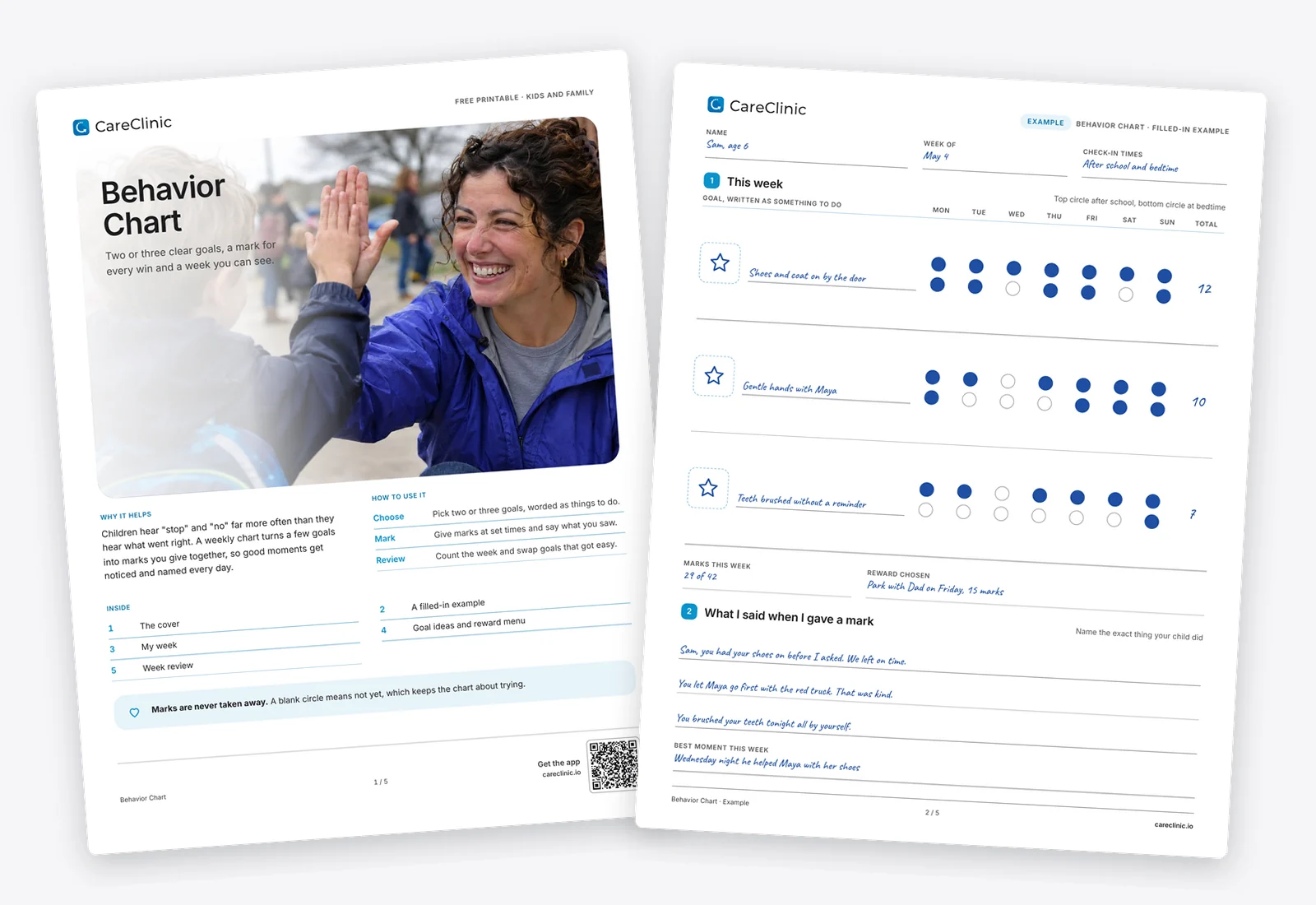
Download the Behavior Chart
- Fill it in on your phone or computer, or print it
- US Letter and A4
- Includes a filled example
How it helps
Clear goals
A goal in a few words, such as shoes on by the door, tells a child exactly what earns a mark.
Praise you can see
Each mark is a moment to notice something going right, which children often hear less than corrections.
Patterns over a week
The review page shows which goals and which days are hardest, so you can adjust instead of guessing.
How to use it
- Choose two or three goals. Write each as a short do statement your child can picture, and draw a picture for it together.
- Build the reward menu. List small rewards and how many marks each costs, from a sticker to choosing dinner.
- Mark it at set times. Check in after school and at bedtime. Fill a circle for each goal met and say what you saw.
- Review at the end of the week. Count the marks, celebrate, and swap a goal that has been easy for two weeks.
What is inside
- Page 1, the coverHow the behavior chart works and what is inside.
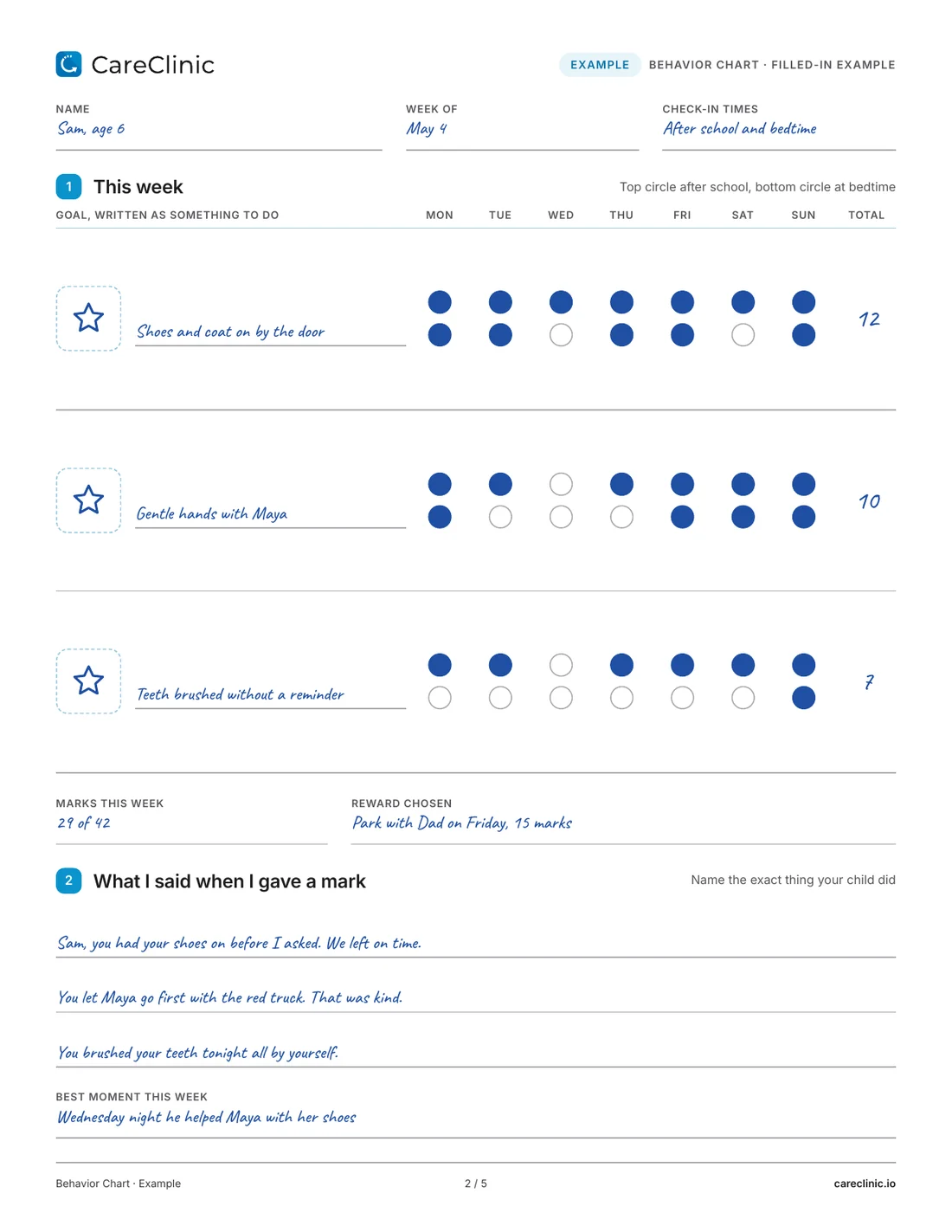
- Page 2, a filled-in exampleSam's week with three goals, 29 marks and the words his parent used.
- Page 3, my weekThree goal rows with picture boxes, seven days and two circles per day.
- Page 4, goal ideas and reward menuSix common trouble spots turned into goals, a reward menu and the rules you agree on.
- Page 5, week reviewTotals, hardest and easiest times, notes from school and questions for your next appointment.
See a filled example
The example follows Sam, who is 6. His goals are shoes and coat on by the door, gentle hands with his sister Maya, and teeth brushed without a reminder. He earned 29 of 42 marks, with Wednesday the hardest day, and spent 15 marks on a trip to the park with Dad on Friday. Under the chart, his parent wrote down the exact words used, such as "You let Maya go first with the red truck. That was kind."
 Open the full PDF
How to write goals your child can reach
Start from the moment that keeps going wrong, then write what you want to happen instead. "No hitting" is hard to reward, because you cannot see something that did not happen. "Hands to yourself, or ask a grown-up for help" is something you can catch and praise.
Keep each goal short enough to fit next to a picture, and pick goals your child already manages about half the time. Page 4 has six ideas to start from, including bedtime stalling, yelling indoors and arguing about screens.
Say what you saw
The mark matters less than the words that come with it. "Good job" tells a child you are pleased. "You put your shoes on before I asked, so we left on time" tells them exactly what to do again. The example page has a few lines like this to copy.
Never take a mark away as a punishment. A blank circle means not yet. A chart that tracks failures soon gets ignored. The American Academy of Pediatrics advises teaching good behavior rather than punishing bad behavior, and that holds during angry outbursts too.
When to change the chart
When a goal is met almost every day for two weeks, it has become a habit. Retire it and pick a new one together. If a goal has stayed mostly blank for two weeks, it is too big. Shrink it to one part of the day, such as mornings only.
Teachers and parents can share one chart. Send it in the backpack and ask the teacher to mark the school goal, then read their notes on the review page.
Tips that make it work
- Keep the behavior chart at your child's eye level and fill the circles with them, not for them.
- Give the reward soon. Young children lose interest when the prize is days away.
- Use pictures as well as words for children who are not reading yet.
- If you track sleep, meals or medicine in the CareClinic app, add a note on hard days so you can compare them with the chart.
Bringing it to your doctor
If you work with a pediatrician, therapist or school team, bring two or three completed weeks and the review page. Patterns such as hard mornings or hard Wednesdays give them something concrete to work with. If behavior is getting worse despite steady use of the behavior chart, or you are worried about anyone's safety, talk to your child's doctor.
Questions
What is a behavior chart?
It is a weekly grid where a child earns a mark, sticker or tick each time they meet a goal agreed in advance. Marks add up to small rewards. The point is to make good moments visible and praise them.
How do you use a behavior chart at home?
Choose two or three positive goals, agree on rewards together, and mark the chart at the same times every day. Review it once a week and change goals as they get easy.
What is the difference between a behavior chart and a reward chart?
People use the names for the same thing. A reward chart usually tracks one goal with stickers toward a prize. A behavior chart often tracks several goals across a week.
Does a behavior chart work for a 4 year old?
Yes, if it is simple. Use one or two goals, a picture for each, and a reward the same day if you can. Young children connect the reward to the goal best when it comes quickly.
Can I use a behavior chart in the classroom?
Yes. A teacher can mark one school goal at a set time each day, and the chart can travel home in a backpack so parents see the same week.
Is this behavior chart free?
Yes. The behavior chart is a free PDF in US Letter and A4 with a filled example, a blank week, goal ideas, a reward menu and a review page.
More free worksheets


References
- Disciplining Your Child. HealthyChildren.org, American Academy of Pediatrics. https://www.healthychildren.org/English/family-life/family-dynamics/communication-discipline/Pages/Disciplining-Your-Child.aspx