
Care that continues between visits.
A provider portal and patient app for clinics, hospitals and care teams.
Patients log symptoms, doses and readings at home in the CareClinic app. Your team sees who needs attention, reviews trends and documents follow-up in the CareClinic provider portal.
The gap between visits.
Clinical software handles documentation and billing. Without a patient app, nothing is captured between appointments.
No patient-facing app
Most clinical platforms lack an app for daily tracking, so medication adherence, symptom patterns and lifestyle data go unrecorded between visits.
Manual follow-up
Outreach calls, phone check-ins and paper tracking take staff hours that could go to patients who need them.
Engagement that does not scale
Portals focus on scheduling, not daily health. Patients lose touch between visits, which can lead to poor adherence and preventable complications.
Undocumented care time
Without structured tracking, care coordination minutes for CCM and RPM go unrecorded and documentation becomes error-prone.
Know who needs attention today.
Set the thresholds once. The portal sorts patients by what changed, so your team starts the day with a short list instead of a full roster.
-
Alert rules for each program
Flag readings, missed doses, questionnaire scores or quiet days, with a priority your team chooses.
-
Overrides for one patient
Tighten or relax a threshold for a single patient after a medication change or new diagnosis.
-
Acknowledge and resolve
Every alert has an owner and a status, so nothing is handled twice or missed.
See what happened between appointments.
Every entry a patient makes lands in one timeline with the time it was logged. Review the trend before the visit, then spend the appointment on decisions.
-
Trends instead of recall
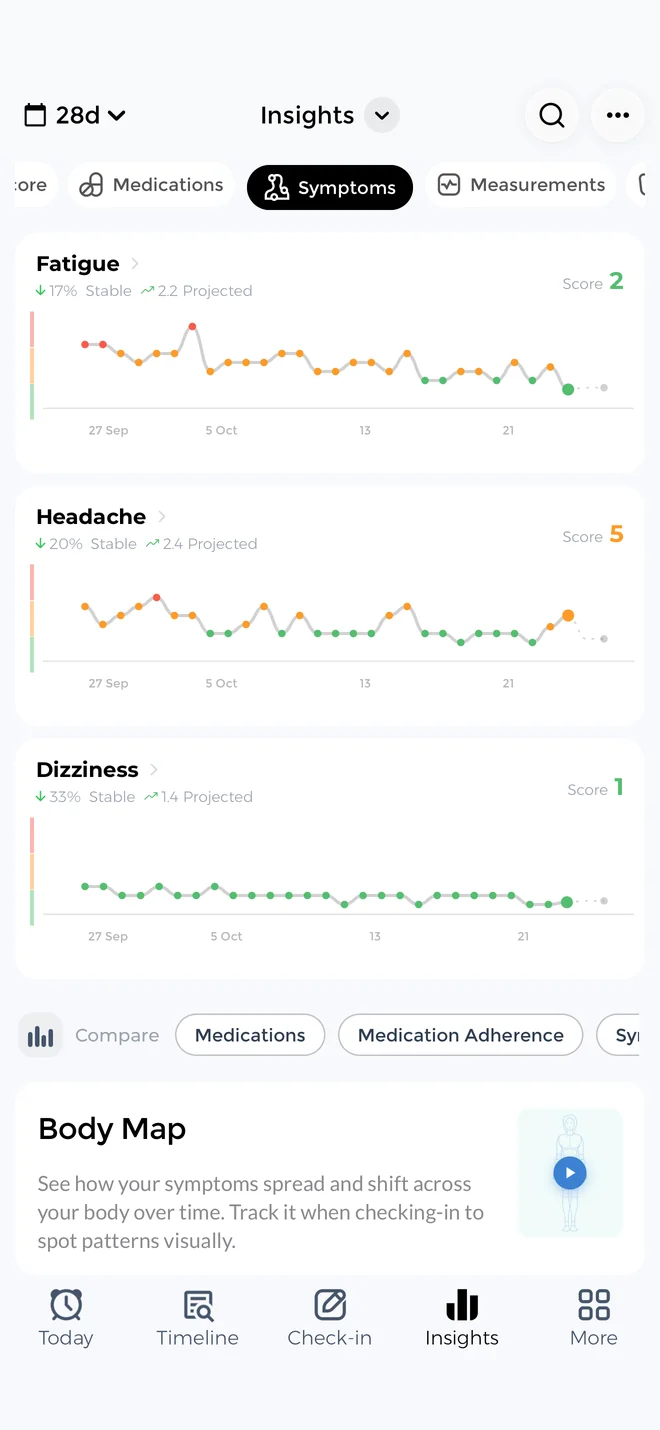
Readings, symptoms and doses are charted over weeks, so changes are clear without asking the patient to remember.
-
Compliance at a glance
See medication adherence and questionnaire completion next to the latest readings.
-
Visit-ready reports
Export a PDF summary or the raw data for the chart, the referral or the care conference.
Document care management time as you work.
Calls, messages and reviews are timed and logged against the patient, so CCM and RPM documentation builds up during the month instead of at the end of it.
-
Time logs by program
Track minutes against CCM (99490) and RPM (99457) for each patient as the month progresses.
-
Encounters and SOAP notes
Record each encounter with a structured note, then lock it when it is signed.
-
Activity logs to export
Export provider activity logs for your billing team and audits.
Maria G., 3 encounters
Daniel K., interactive call logged
Built for the care models you already run.
Use one patient app across programs, and keep each plan specific to the condition you treat.
Chronic care management
Track medications, symptoms and measurements for long-term conditions with care plans that keep follow-up consistent.
Pre and post-op care
Pre-op checklists, wound photos and pain scores help your team spot problems after discharge.
Patient-reported outcomes
Schedule PHQ-9, GAD-7, PROMIS and custom questionnaires with reminders and completion tracking.
Preventive health
Support goals for weight, blood pressure, activity and sleep, with adherence you can review over time.
Remote patient monitoring
Patients record blood pressure, glucose and weight at home or sync them from connected devices.
Chronic care management app for doctors
One roster for every program, with the alerts, timelines and time logs described above.
Everything a clinical team needs in one portal.
The tools around the data matter as much as the data itself.
Team roles and access
Give physicians, nurses and coordinators the access their role needs, and add seats as the program grows.
Access logs
Every view of a patient record is logged, so you can answer who looked at what and when.
Secure messages and texts
Message patients inside the app or send text reminders, and keep the conversation with the record.
Appointments
Schedule visits and follow-up calls, with the day’s appointments next to the attention list.
Documents and consent
Share care instructions and collect consent forms without paper.
EHR integration
Connect through FHIR-based integrations with systems such as Epic, Cerner and Allscripts, or export PDF, CSV and FHIR files.
What your patients use.
Patients get a complete health app of their own, so logging helps them as much as it helps you. That is what keeps the data coming.
-
Reminders that arrive on time
Dose and check-in reminders with snooze, plus a refill alert before medication runs out.
-
Their own insights
Patients see their trends and what affects their symptoms, which gives them a reason to keep logging.
-
Caregivers can help
With permission, a family caregiver can record doses and symptoms on a patient’s behalf.
From setup to enrolled patients.
Most teams go from first call to enrolled patients in a few weeks.
-
Configure your platform
Set up your organization profile, branding and dashboard access. White-label deployment is completed in under 2 weeks.
-
Train clinical staff
A single 1-hour virtual session covers the provider dashboard, patient enrollment and reporting.
-
Enroll patients
Invite patients by email or during an appointment. They download the app and start tracking with no complex setup.
-
Review and follow up
Work the attention list, review timelines and log time as you reach out.
Questions providers ask.
What can patients track in CareClinic?
Patients record symptoms, medications, vital signs such as blood pressure, glucose, weight, temperature, oxygen saturation and heart rate, plus mood, pain, activity, sleep and nutrition. They can answer scheduled questionnaires and sync readings from Apple Health, Health Connect and connected devices. Custom trackers can be created for any metric your protocol needs.
Is CareClinic a chronic care management app for doctors?
Yes. Patients track medications, symptoms and measurements against a care plan, and your team uses the provider portal for alerts, timelines, encounters and CCM time logs.
How do I monitor patient medication adherence remotely?
Patients log medications and receive reminders for each dose. Your team views adherence rates, missed doses and refill schedules in the provider portal, and alert rules flag patients who miss critical medications.
Does CareClinic track time for CCM and RPM?
Yes. The portal logs care management minutes, encounters and SOAP notes by patient, with trackers for CCM (99490) and RPM (99457), and exports provider activity logs for your billing team.
Can patients share their health data with multiple doctors?
Yes. Patients can grant access to multiple providers, specialists and care team members, and everyone with access views the same patient data.
Can patients use CareClinic before and after surgery?
Yes. Patients can follow a pre and post-operative plan, record pain, wound photos and recovery at home, and share that information with your team.
What training do providers need for remote patient monitoring?
Clinical staff receive a 1-hour virtual training session covering the provider dashboard, patient enrollment workflows and reporting tools, with documentation and ongoing support afterwards.
What patient adoption rates can I expect with remote monitoring?
Healthcare organizations typically see 70-85% patient enrollment when the app is introduced during clinic visits. Simple onboarding removes common technology barriers.
Is CareClinic a remote patient monitoring platform?
Yes. Patients record blood pressure, glucose, weight and other readings at home or sync them from connected devices, and your team reviews them in the provider portal with alert rules, timelines and RPM time logs.
What does remote patient monitoring involve with CareClinic?
Patients record readings such as blood pressure, glucose and weight at home or sync them from connected devices. Your team reviews those readings alongside symptoms and medication use, and alert rules flag readings outside the thresholds you set.
How does CareClinic help with follow-up after discharge?
Patients follow a recovery plan at home and log pain, wound photos, symptoms and doses each day. Your team sees changes in the attention list and can call before a small problem becomes a readmission.
Can patients use their own devices?
Yes. Patients use the app on their own iPhone, Android phone or Apple Watch, and readings from Apple Health, Health Connect and Withings sync automatically.
Does CareClinic integrate with our EHR?
Yes. CareClinic supports FHIR-based integrations with major EHR systems including Epic, Cerner and Allscripts. Data can also be exported as PDF, CSV or FHIR files, and custom API integrations are available for legacy systems.
Can we offer CareClinic under our own brand?
Yes. CareClinic offers white-label deployment, so your organization can give patients the app under its own name. See the white-label patient app.
Bring patient-reported data into your care model.
Tell us how your team cares for patients, and we will show you how CareClinic fits.