
CareClinic browser extensions
Keep up with medications, symptoms, and daily check-ins from the browser you already use. Everything stays connected to your account, so your health routine can move with you between desktop, mobile, and web.
Use your existing account and continue from the same health record on any supported device.
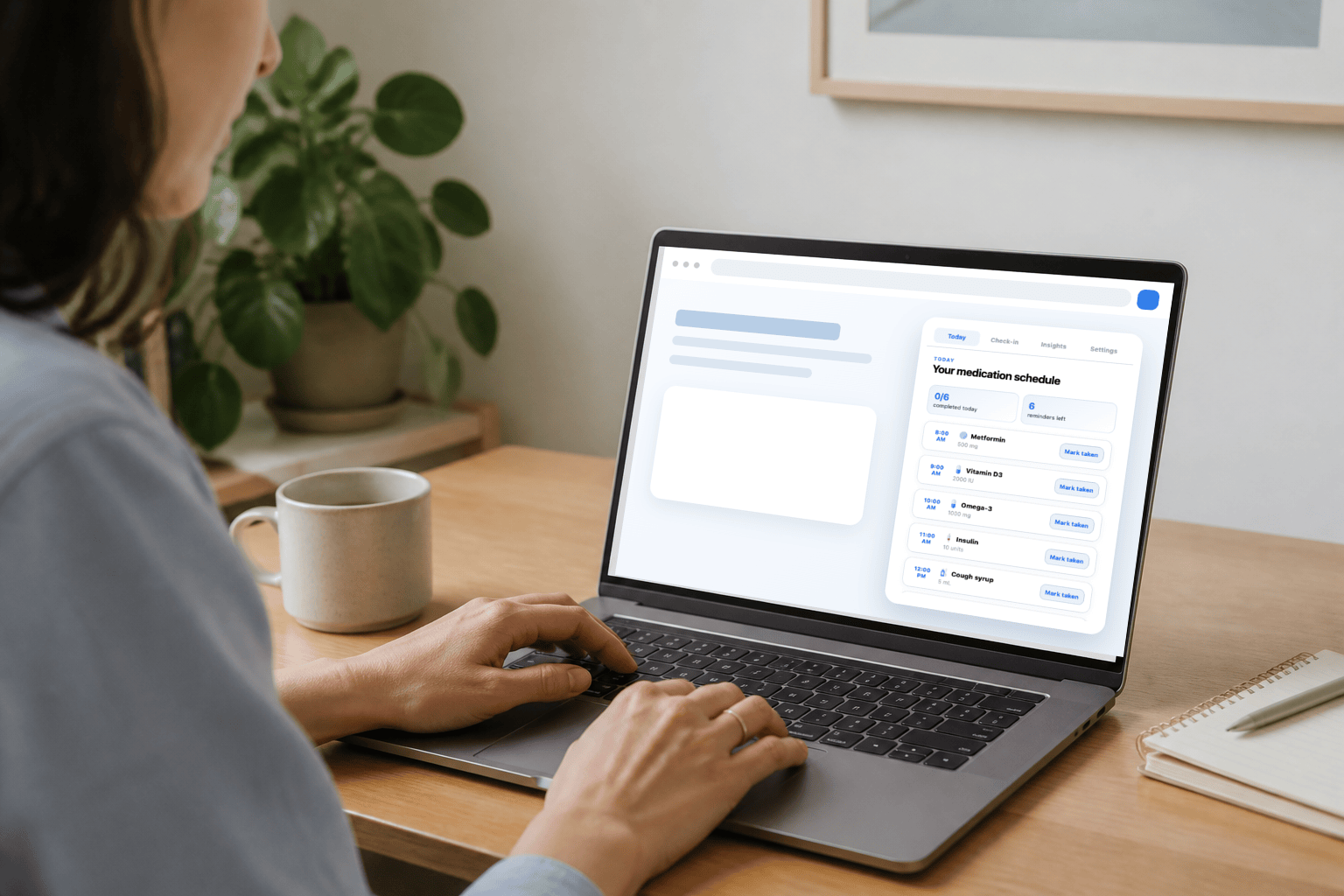
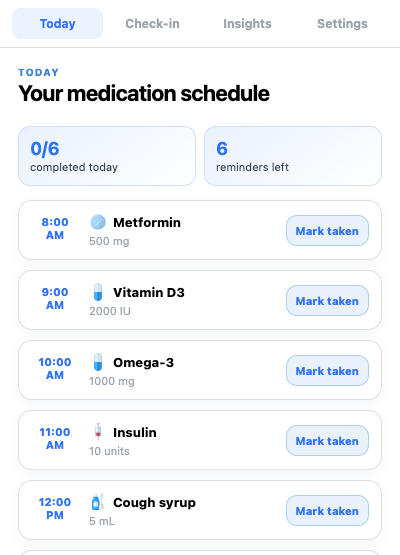
Your day at a glance
Daily care without reaching for your phone
Open CareClinic from your browser to see what is due, record what you have taken, and keep your health timeline current while you are at your computer.
Review Today
See scheduled medications and supplements from your care plan.
Mark taken
Record a medication directly from its scheduled row.
Record symptoms
Choose from the symptoms already available in your tracker.
See recent activity
Review a clear snapshot of your latest entries.
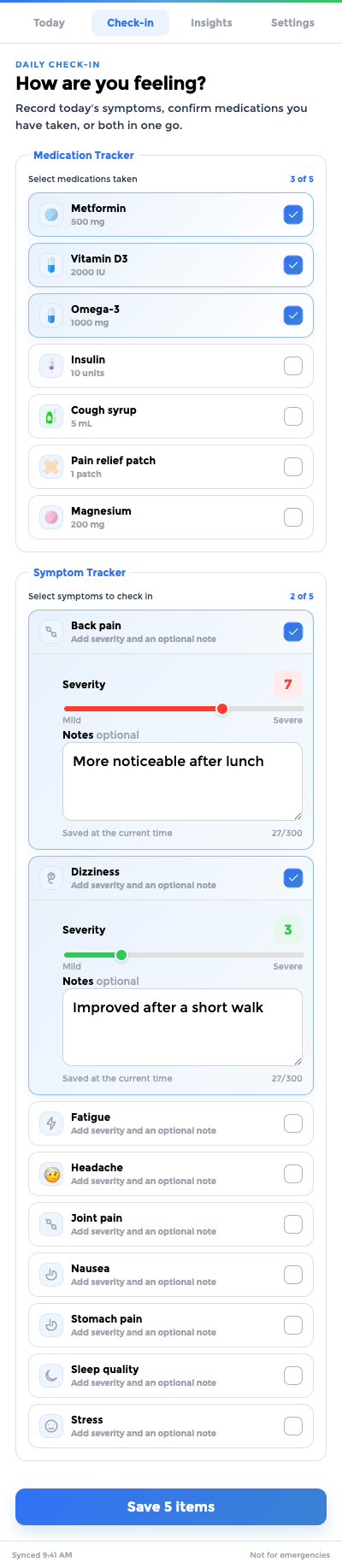
Medication and symptom check-in
One check-in for medications and symptoms
Choose what you have taken and how you are feeling without opening separate trackers. The check-in uses the medications and symptoms already connected to your account.
- Select one or more medications you have taken.
- Select one or more symptoms to record.
- Set a severity for each symptom and add a note when it helps.
- Save the check-in to your timeline.
Desktop reminders
Medication reminders where you will notice them
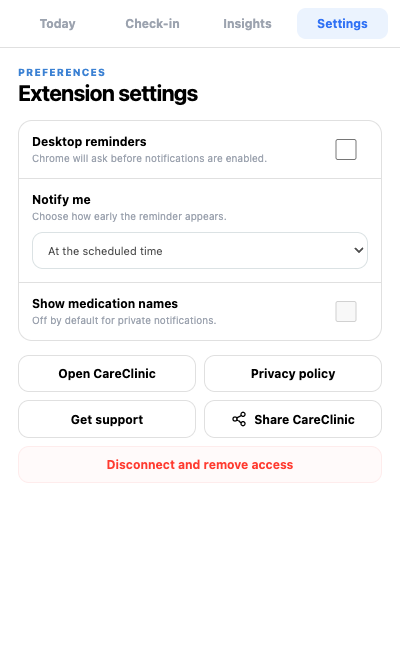
Turn on reminders when you want CareClinic to notify you around a scheduled medication time. You choose what appears and can change it from Settings at any time.
- Desktop reminders turns reminders on or off.
- Show medication names controls whether names appear in reminder text.
- Notify me sets how early each reminder should appear.
- Review or change reminder choices in Settings.
Privacy by design
Privacy that is easy to understand
CareClinic is built to support your health routine without following what you do elsewhere. You decide when to connect, what reminder details appear, and when to disconnect.
Your entries stay private
Your health entries remain part of your private account.
Your browsing stays yours
CareClinic does not track the pages you visit or what you do on other websites.
You control reminder details
Choose whether reminders are on and whether medication names appear.
Disconnect whenever you want
Remove browser access from Settings whenever it no longer suits your routine.
Explore features
Find guidance for the trackers in the browser extension or continue with the complete CareClinic app on your phone.
More ways to check in and review insights are on the way.
In the browser extension
Find guidance for medication tracking, symptom check-ins, and Today.
In the app
Take your health routine with you and use the complete experience on iOS or Android.
Browser extensions FAQ
What do the browser extensions include?
They bring common health-tracking actions to a supported desktop browser, including medication schedules, symptom check-ins, recent activity, and reminder choices.
Do I need an account?
Yes. The browser extension connects to your existing account so your supported check-ins stay together.
What can I record from the browser?
You can review scheduled medications, mark medications taken, and record one or more symptoms with separate severity values and notes.
Do check-ins appear in the app?
Yes. Supported medication and symptom check-ins use the same account as the mobile and web experiences.
How do desktop medication reminders work?
When reminders are enabled, the browser can notify you around scheduled medication times using the choices saved in Settings.
Does the browser extension track my browsing?
No. It does not track your browsing history, page content, or activity on other websites.
How do I disconnect?
Open Settings and choose the disconnect option. This removes the browser connection and stops its reminders.
Does the browser extension provide medical advice?
No. It records information you choose to track and does not diagnose conditions, recommend treatment, or provide emergency care.
Get started
Your health tracker, right where you are
Connect once, return from your toolbar, and keep using the same CareClinic account across supported browsers and devices.
Start in three simple steps
Your account stays at the center of the experience.
Add the browser extension
Choose the supported browser you use on your computer.
Log in to CareClinic
Use the website to connect your existing account.
Open it from your toolbar
Review Today, check in, or adjust reminder choices.
Choose your browser
Choose your browser to keep check-ins and reminders close by while you use your computer.