


A medication list template gives you one page that answers the question every nurse, pharmacist and doctor asks: what do you take? It is for anyone who takes more than one medicine, and for the family member who keeps track for them.
Write each medicine once with its strength, how you take it and why. Add vitamins, as-needed medicines, allergies and the people to call. Then copy the short version onto the wallet card so it is with you if you ever cannot answer for yourself.
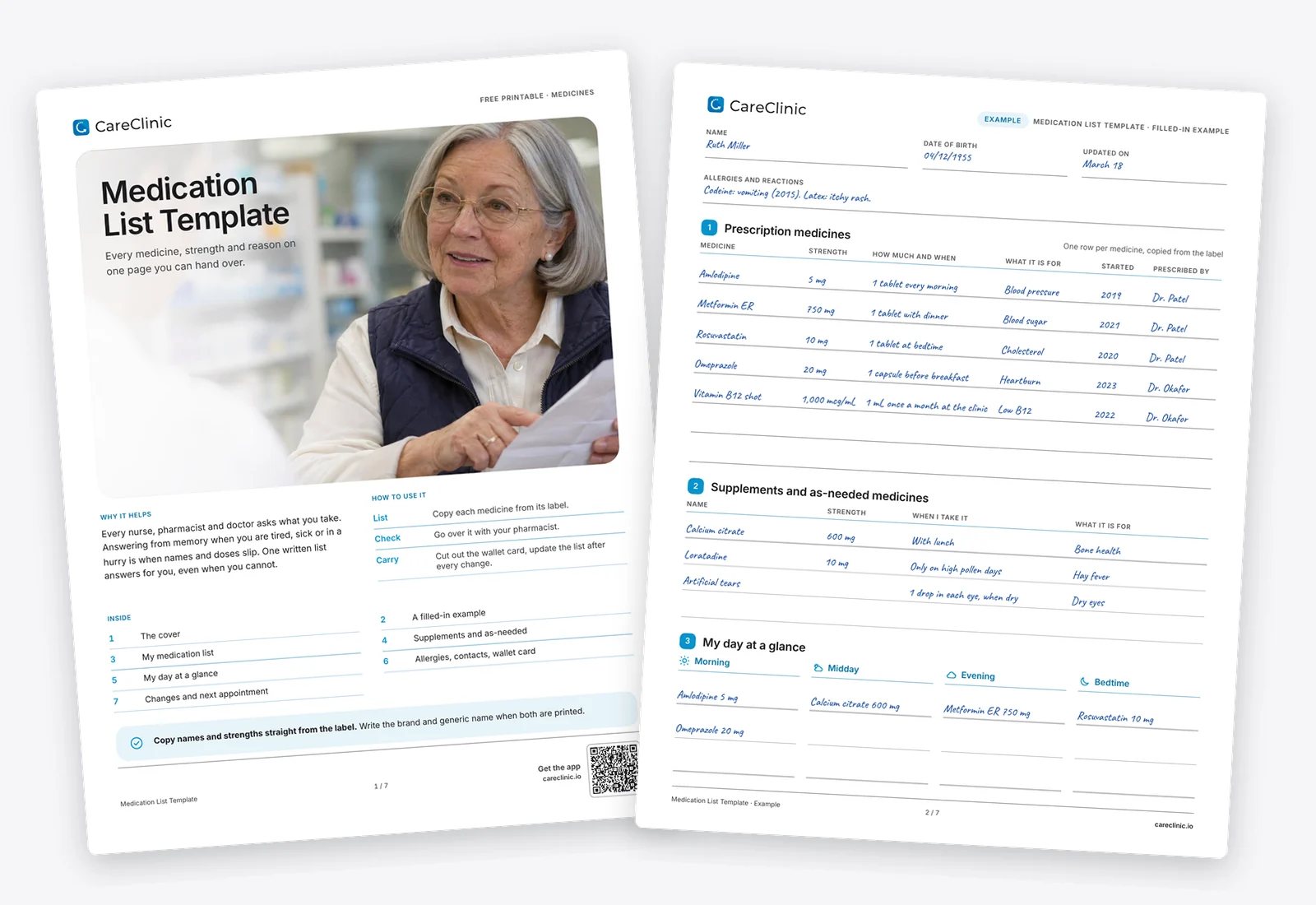
Download the Medication List Template
- Fill it in on your phone or computer, or print it
- US Letter and A4
- Includes a filled example
How it helps
One true list
The medication list template puts prescriptions, over the counter medicines and supplements in one file, so nothing gets left out.
Faster visits
Hand the pages over at check in instead of trying to remember names and strengths on the spot.
Safer changes
The changes log shows what started or stopped and who decided, which helps catch mix ups after a hospital stay.
How to use it
- Gather everything you take. Print the medication list template or open it on screen, then put your labels, boxes, inhalers, creams and supplements in front of you.
- Fill one row per medicine. Copy the name and strength from the label, then how much you take, when, and what it is for.
- Sort your day and add contacts. Write each medicine under morning, midday, evening or bedtime, list your allergies and care team, and fill the wallet card.
- Review and update. Go over the list with your pharmacist, then log every change on the last page on the day it happens.
What is inside
- Page 1, the coverHow to use the sheet and what is inside.
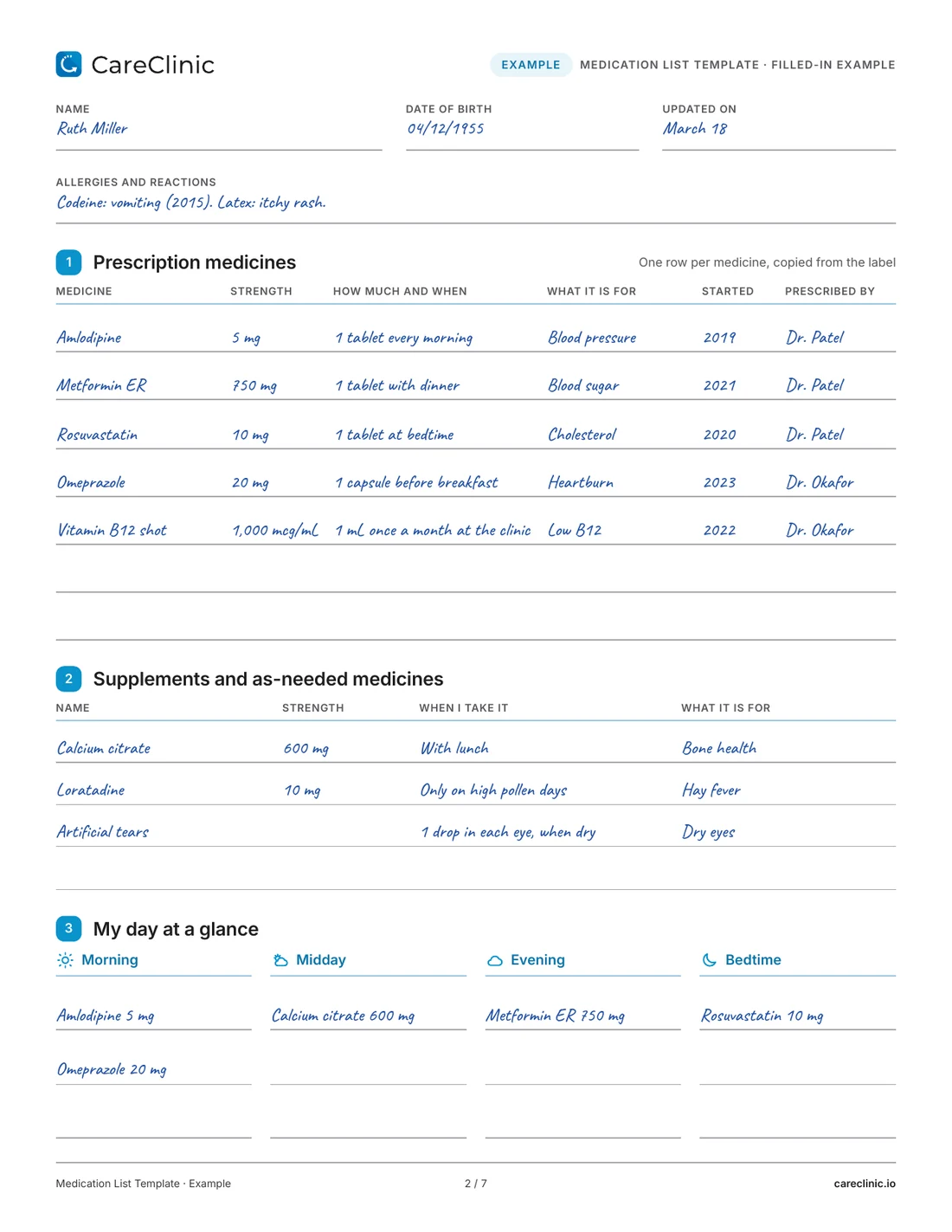
- Page 2, a filled-in exampleRuth's medicines, supplements and day at a glance.
- Page 3, my medication listRows for every prescription with strength, timing, reason, start year and prescriber.
- Page 4, supplements and as-needed medicinesVitamins, medicines you take only some days, and inhalers, creams, drops, patches or injections.
- Page 5, my day at a glanceMorning, midday, evening and bedtime columns, set-day medicines and a review log.
- Page 6, allergies, contacts and wallet cardReactions, your care team phone numbers and a card to cut out and fold.
- Page 7, changes and my next appointmentA dated log of every change and space for questions.
See a filled example
The example on page 2 of the medication list template belongs to Ruth, who sees two doctors. Her list shows five prescriptions, including a vitamin B12 shot she gets once a month at the clinic, plus calcium with lunch, an allergy tablet on high pollen days and eye drops when her eyes feel dry. Her codeine reaction is written above the medicines, and her day at a glance shows two medicines in the morning, one at midday, one with dinner and one at bedtime.
 Open the full PDF
What to include on a medication list
Each row needs the medicine name exactly as the label spells it, the strength, the amount and timing, and the reason you take it, in plain words. Add the prescriber and the year you started. If the box lists both a brand name and a generic name, note both.
Over the counter medicines, vitamins and herbal products belong on the list too. Some of them change how a prescription works, and they are easy to forget to mention. Medicines you take only when needed, and things that are not tablets, such as inhalers, creams, eye drops, patches and injections, have their own tables on page 4.
Put allergies at the top, with what happened. If you have none, write No known drug allergies, because a blank line leaves a nurse guessing.
When to use it
Start a list when you take two or more medicines, before a hospital stay or surgery, and when someone else helps manage your medicines. Update it after every appointment where something changed, after a hospital discharge, and whenever you switch pharmacies.
Caregivers often keep one medication list template per person they look after. Writing the person's name and the date at the top of each page avoids mix ups, and the care team page puts every phone number in one place.
What it can and cannot show
A medication list shows what you take as of the date on the page. It helps your pharmacist and doctor spot duplicates, gaps and possible interactions, and it gives paramedics the basics if you cannot speak for yourself.
It cannot tell you whether a dose is right or whether two medicines are safe together. That is a question for your pharmacist or doctor. It is also only as current as your last update, so an old list can mislead.
Tips that make it work
- Copy names and strengths straight from the label, not from memory.
- Keep one copy of your medication list template in your bag and one on the fridge, and take a photo of it on your phone.
- Fill the change log on the day a medicine changes. Dates are the first thing people forget.
- If you miss doses because the times are hard to remember, set reminders in the CareClinic app for each time on your day at a glance page.
Bringing it to your doctor
Bring your filled medication list template to every appointment, including dentist and specialist visits, and ask the person you see to check it against their records. Ask your pharmacist to go over it once a year or whenever you start something new, and note the date on the review log. If you think a medicine is causing a new symptom, or you have missed doses and are not sure what to do, call your pharmacist or doctor rather than waiting for the next visit.
Questions
What should be included in a medication list?
Include the name and strength of every medicine, how much you take and when, and what it is for. Add over the counter medicines, vitamins and herbal products, your allergies, and who prescribed each one. This medication list template has a table or page for each of these.
How do I create a medication list?
Start with your labels in front of you and write one medicine per row. Copy the name and strength exactly, then add the dose and timing in your own words. Finish with supplements, allergies and contacts, and date the page.
How do I get a list of my medications?
Your pharmacy can print a list of everything they have filled for you, and many patient portals show one too. Compare it with what you really take. It will miss samples, over the counter products and medicines from other pharmacies, and it may still show medicines you stopped.
Is there a wallet size medication list?
Yes. Page 6 has a wallet card with your allergies, key medicines, conditions and emergency contact. Cut along the dashed line, fold it in half and keep it with your ID.
Can I make a medication list in Excel or Google Sheets instead?
You can. A spreadsheet works well on a computer but is harder to fill in on a phone or carry with you. This PDF can be typed into on screen or printed, and it keeps the wallet card and change log in the same file.
Is this medication list template free?
Yes. The medication list template is a free PDF in US Letter and A4. You can type into it on a phone or computer, or print it and fill it in by hand.
More free worksheets
References
- Create and Keep a Medication List for Your Health. U.S. Food and Drug Administration. https://www.fda.gov/consumers/consumer-updates/create-and-keep-medication-list-your-health