
Use your HSA or FSA for CareClinic
One short form, signed by your provider, is usually all your plan needs.
If you have upgraded to track a condition with your care team, download the form, get it signed at your next visit, and send it in with your receipt.
- Works with HSA, FSA and HRA plans
- One signature covers a year
- Fill it in on your phone
 Ready to sign
How it works
Pay as usual, then claim it back.
Download the form
Add your name and date of birth.
Your provider signs
At your visit or through your patient portal. The letter is already written.
Get your receipt
It is already in your email.
Send it in
Upload the form and receipt to your HSA or FSA.
Why plans approve it
Your plan wants a provider’s confirmation. The form provides it.
It supports the management of your condition
Your provider confirms you use it to manage a diagnosed condition. That makes it a medical expense.
It keeps your records ready
Storing your health records for the providers who treat you also counts as medical care.
The IRS rules are in Questions below.
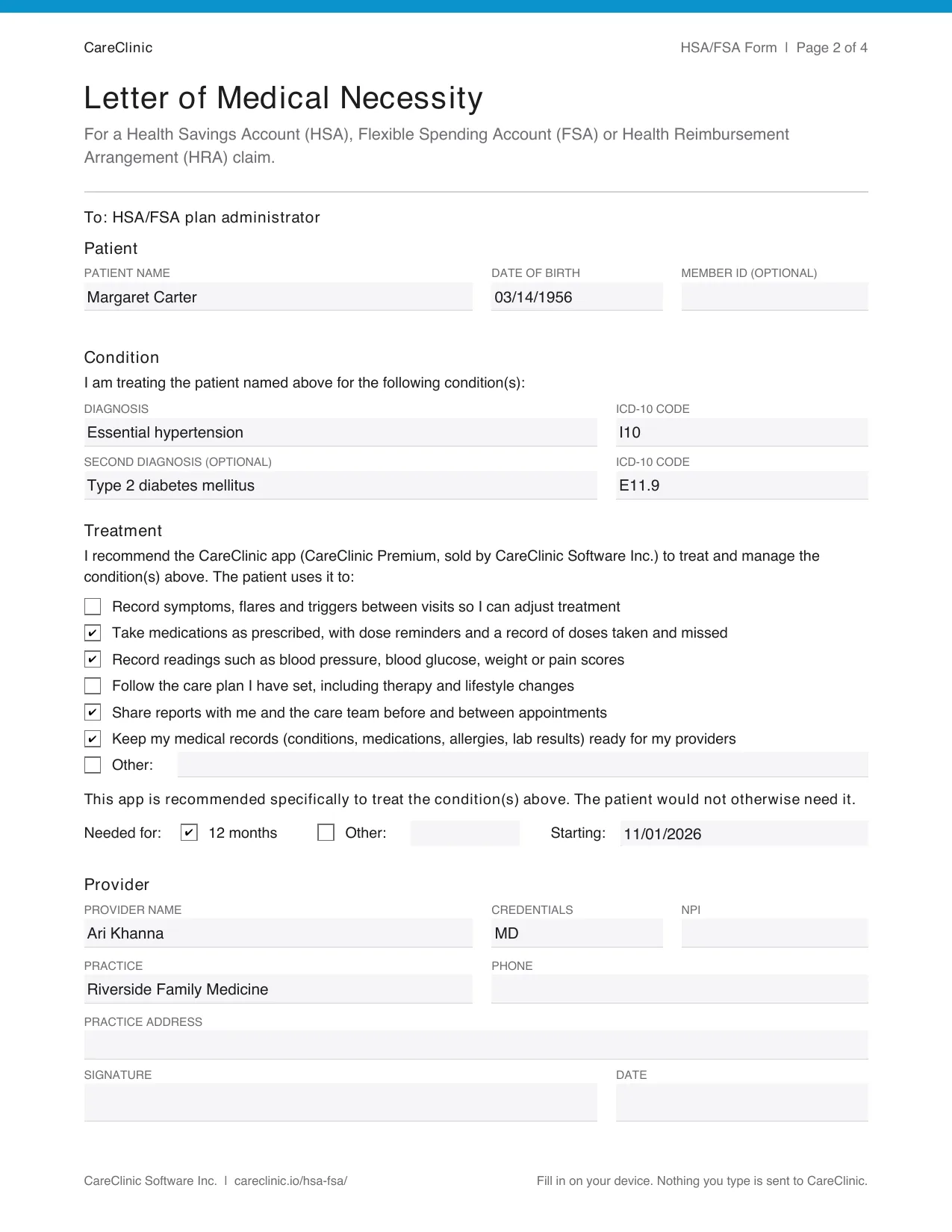
Ready to sign
Your provider ticks a few boxes, adds a diagnosis code and signs. Everything else is written.
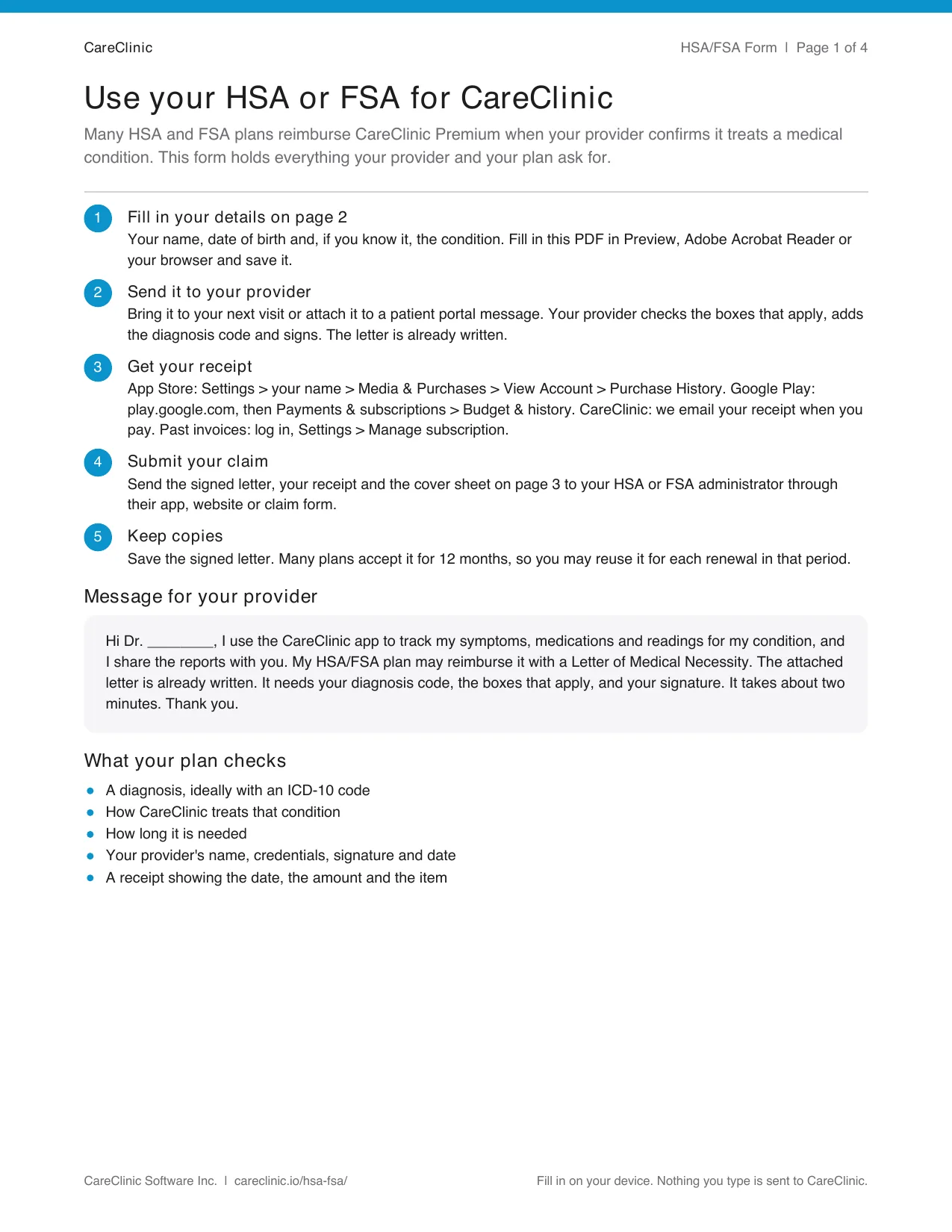
Checklist
What to do, and a message you can send your provider.
Letter of Medical Necessity
Already written. Your provider ticks and signs.
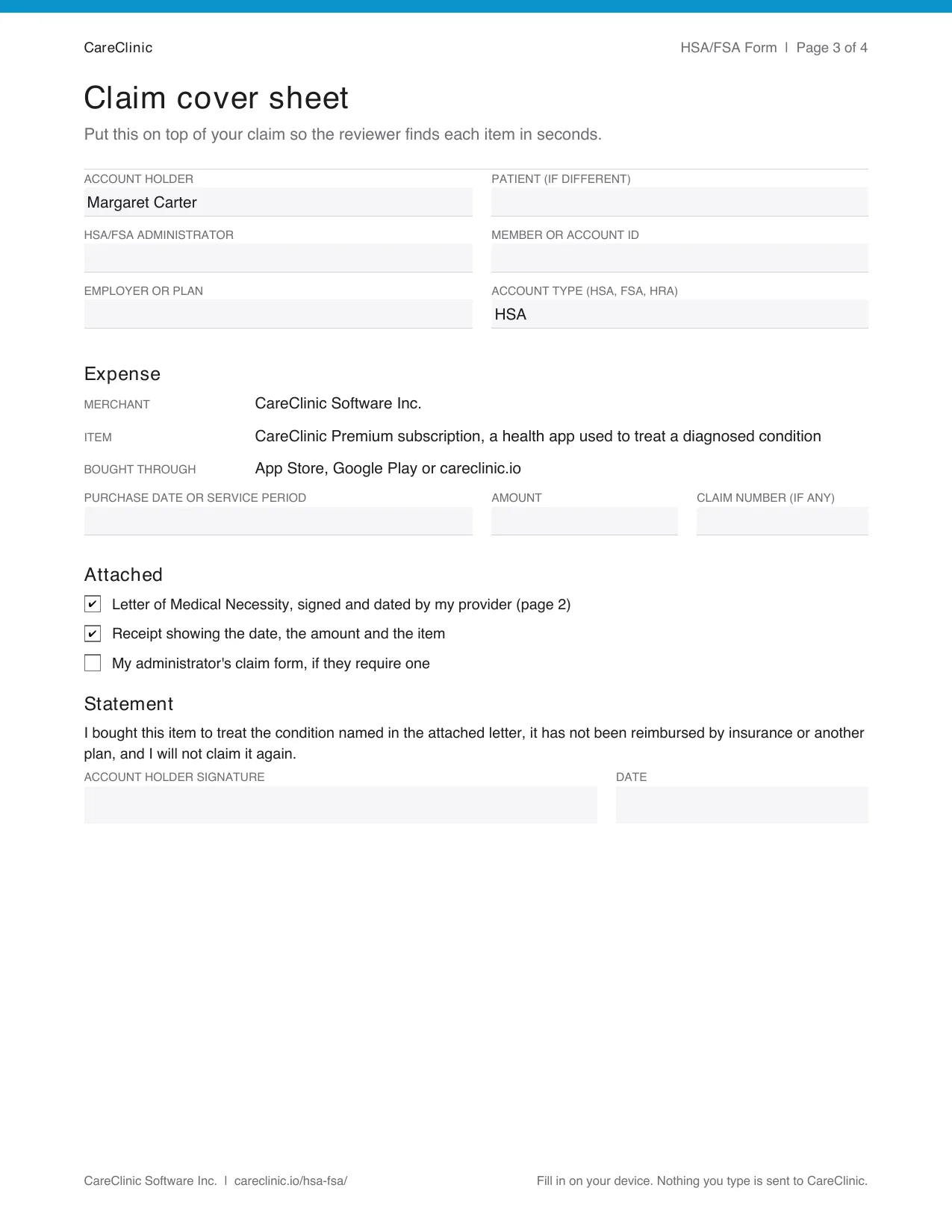
Cover sheet
Everything your plan checks, on one page.
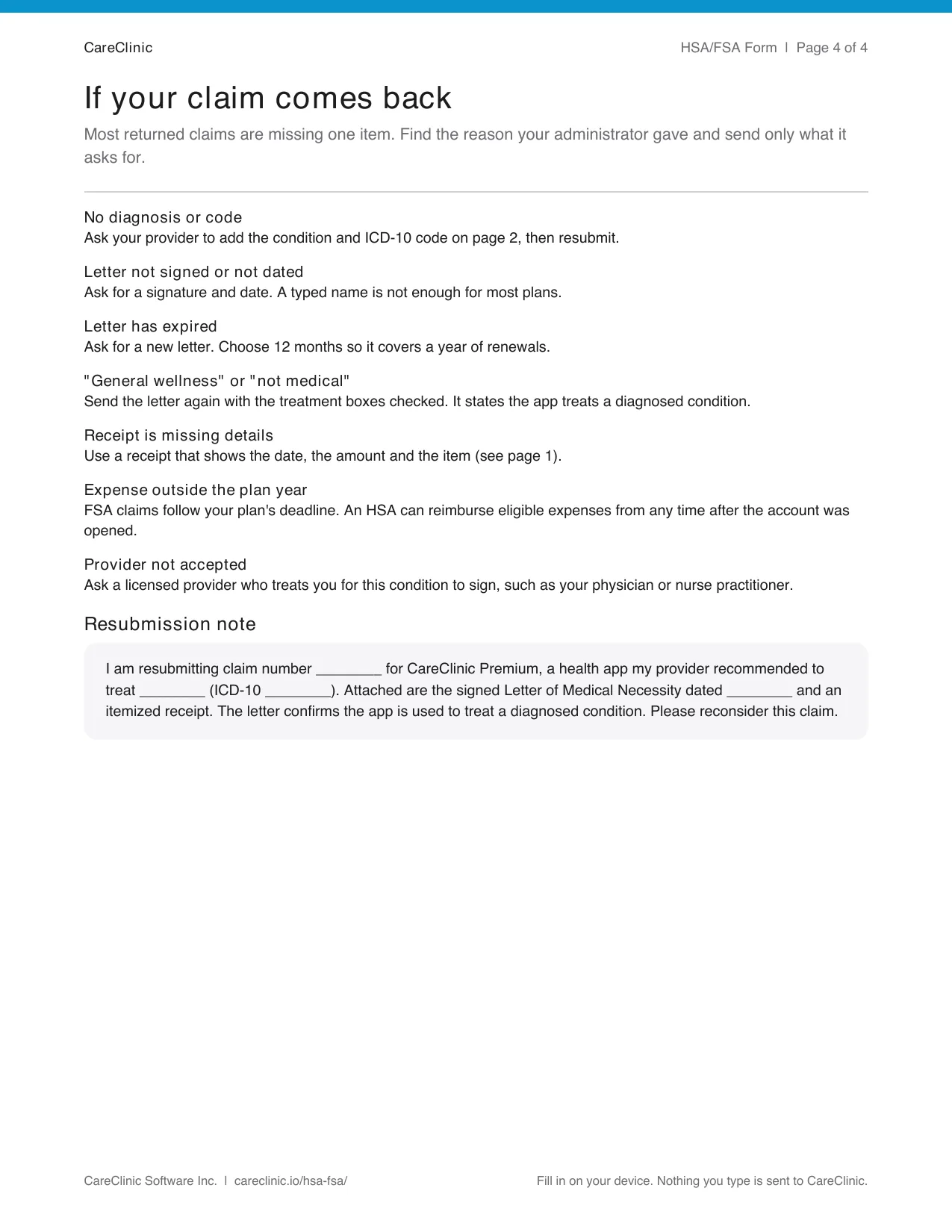
If a claim comes back
The fix, and a note to resend.
Bring a report to your visit
Your provider signs faster when they can see how you use it.
Visit Prep
What changed since your last visit.
PDF health reports
Your logs from the last 90 days.
Medication Tracker
Doses taken and missed.
Symptom Tracker
How flares change over time.
Measurements Tracker
Blood pressure, glucose and weight.
Care Plans
The plan your provider set.
Get your receipt
Use the receipt for the purchase you claim.
App Store
Apple emails it. On iPhone, open Settings, tap your name, then Media & Purchases and Purchase History.
Google Play
Google emails it. In Google Play, open Payments & subscriptions, then Budget & history.
CareClinic
CareClinic emails your receipt when you pay. For past invoices, log in, open Settings and choose Manage subscription.
Keep your insurance cards and member ID in Insurance Records, so they are at hand when you file.
If a claim comes back
It is usually one missing item. Here is the fix.
No diagnosis code
Ask your provider to add the condition and code.
Not signed or dated
Ask for a signature and date. A typed name is usually not enough.
Letter expired
Ask for a new one for 12 months.
"General wellness"
Resend the letter with the treatment boxes ticked.
Receipt missing details
Use one that shows the date, amount and item.
Annual plan on an FSA
Claim it month by month, or as your plan allows.
Questions
Is CareClinic HSA/FSA eligible?
It can be. Many HSA, FSA and HRA plans reimburse it when your provider recommends it to treat a diagnosed condition. The form documents this, and your plan decides each claim.
Is CareClinic covered by insurance?
Most health insurance plans don't pay for app subscriptions directly. In the US, the usual route is your HSA, FSA or HRA with a signed form. For other countries, see Outside the US below.
Does health insurance cover health apps?
Rarely as a standard benefit. Spending accounts are the usual route, such as an HSA, FSA or HRA in the US.
Can I use my HSA for an app subscription?
Yes, when it's a medical expense for you. Most plans ask for a provider's letter naming your condition and an itemized receipt.
What IRS rules does it qualify under?
Medical care under IRS Publication 502 and Internal Revenue Code §213(d), for a product your provider recommends to treat a diagnosed condition. Revenue Ruling 71-282 also treats fees for storing your medical information, so any provider treating you can see it, as medical care.
Is a health app tax deductible?
In the US, medical expenses above 7.5% of your adjusted gross income are deductible if you itemize, and an app used to treat a condition can count. You can't deduct an amount your HSA or FSA already paid back.
Can I pay with my HSA or FSA card?
Pay with your usual card in the App Store, Google Play or on careclinic.io, then submit a claim to be paid back.
What is a Letter of Medical Necessity?
A short letter from your provider that names your condition and how a product treats it. HSA and FSA plans use it to approve items that aren't automatically covered.
How long is the letter valid?
Many plans accept a letter for 12 months, so one signature can cover a year of renewals.
Who can sign the letter?
A licensed provider who treats you for the condition, such as a physician, nurse practitioner or physician assistant. Some plans also accept a psychologist or licensed therapist.
Does an annual plan work with an FSA?
Yes. An FSA pays back as the service is provided, so an annual plan is usually claimed month by month within your plan year.
Is there a deadline to submit?
FSA claims must reach your plan by its deadline. An HSA can pay back eligible expenses from any time after the account was opened, so keep your receipts.
Does CareClinic see what I type in the form?
No. The PDF fills in on your device and nothing you type is sent to CareClinic.
Outside the US
It depends on your plan, not the app. Here is where it usually works.
Canada
Works: a Lifestyle Spending Account (LSA), or a Personal or Wellness Spending Account. Sun Life's list includes health apps. It is taxed as a benefit.
Usually not: a Health Spending Account or the medical expense tax credit.
United Kingdom
Works: an employer wellbeing budget or benefits platform, if you have one.
Usually not: health cash plans.
Australia
Works: NDIS low-cost assistive technology, under $1,500, when it supports your plan goals.
Usually not: private health extras cover.
New Zealand
Works: Disability Support Services flexible funding, such as Individualised Funding, when it fits your plan. An employer wellbeing allowance also works and is usually taxed.
Usually not: health insurance such as Southern Cross.
Germany
Works: an employer health benefit. Ask your HR team.
Usually not: statutory health insurance, which only pays for apps in the BfArM DiGA directory.
Netherlands
Works: supplementary insurance (aanvullende verzekering) with an online health program or health budget, or an employer budget under the werkkostenregeling.
Usually not: basic insurance (basisverzekering).
International form
A recommendation for your health professional and a claim cover sheet. Fill it in on your device.