
How to Use a Medication Tracker
Set it up once in about five minutes and stop guessing whether you took your pills.
Add your medicines, set reminders that match your real routine and log each dose, so you always know what you took and when.
Get CareClinicStart with step one
Download for Free.
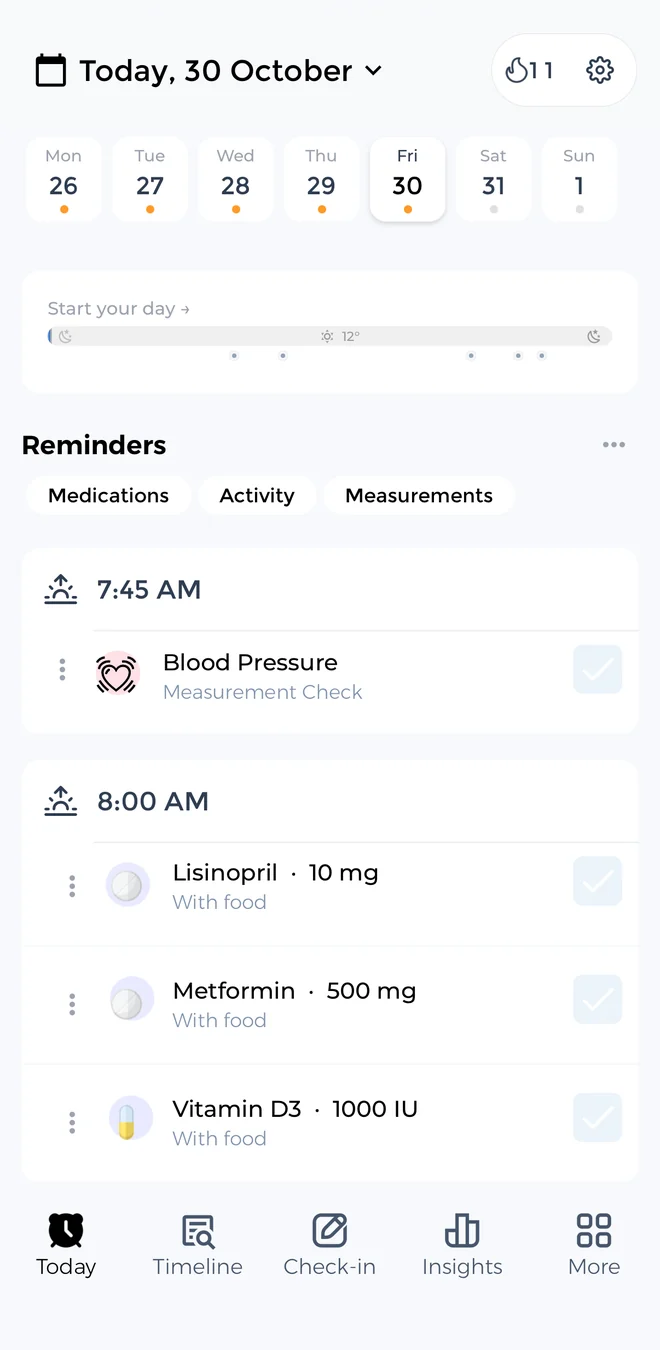
Why old methods fall short
Old methods work until life gets busy. A tracker records what actually happened.
| Feature | Pill organizer | Phone alarm | Paper | Tracker app |
|---|---|---|---|---|
| Shows if a dose was taken | No | No | No | Yes |
| Sends alerts | No | Yes | No | Yes |
| Tracks patterns | No | No | No | Yes |
| Refill help | No | No | No | Yes |
| Interaction warnings | No | No | No | Yes |
Pill organizers
They can't tell you whether you took the tablet or only opened the compartment. Filling them is another weekly chore, and they give no adherence or refill insight.
Phone alarms
Alerts are easy to dismiss without taking the dose, and later you can't tell whether you already took it. They can't handle spacing or food instructions.
Paper and sticky notes
They only work if you remember to update them, and notes get lost or become illegible. They can't show patterns, predict refills or warn you about interactions.
A proper medicine tracker app solves all these problems at once.
The complete medication tracker guide
Everything from choosing a tracker to making it a daily habit.
It's 3 AM and you're lying awake, trying to remember if you took your blood pressure pills before bed. Taking another dose could be dangerous, but skipping it might mean your blood pressure spikes. This mental gymnastics happens to millions of people every single day, turning what should be simple healthcare into a source of constant anxiety.

Choose the right tracker
Poor medication management costs more than convenience. Missed doses leave conditions uncontrolled, wrong timing reduces effectiveness or causes side effects, and each extra condition multiplies the complexity.
Learning how to use a medication tracker isn't just about downloading another app; it's about taking control of your health outcomes.
Let's be honest about how most of us manage pills. There's the kitchen counter covered in prescription bottles, maybe a weekly pillbox if you're organized, and perhaps some notes scribbled on a calendar. These methods seem fine until life gets complicated.
You travel for work, stay late at the office, or have a sick child who needs attention. Suddenly, your fragile system crumbles, and you're left guessing about doses, worried about interactions, and stressed about whether you're taking your tablets correctly. A medication reminder app can transform this chaos into confidence.
Step 1: Add your medicines
Start with your most important medicine and add the rest one at a time. Setup takes minutes, far less than the mental energy of managing tablets from memory.
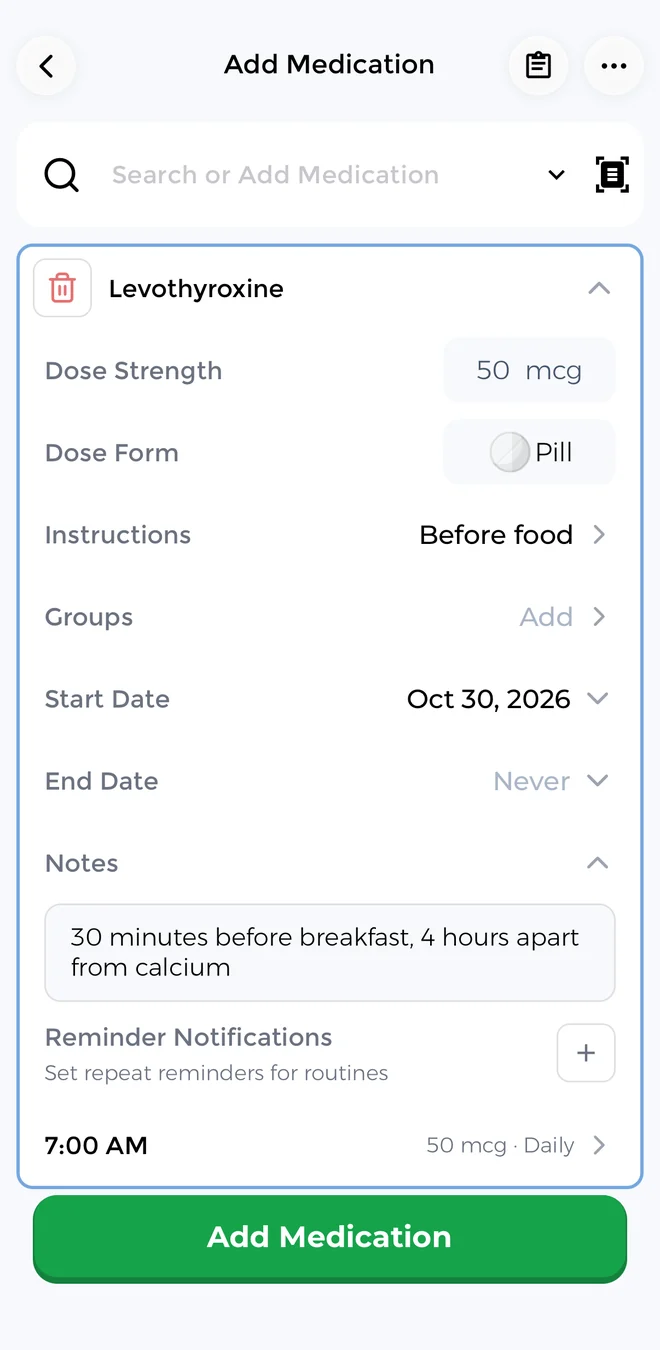
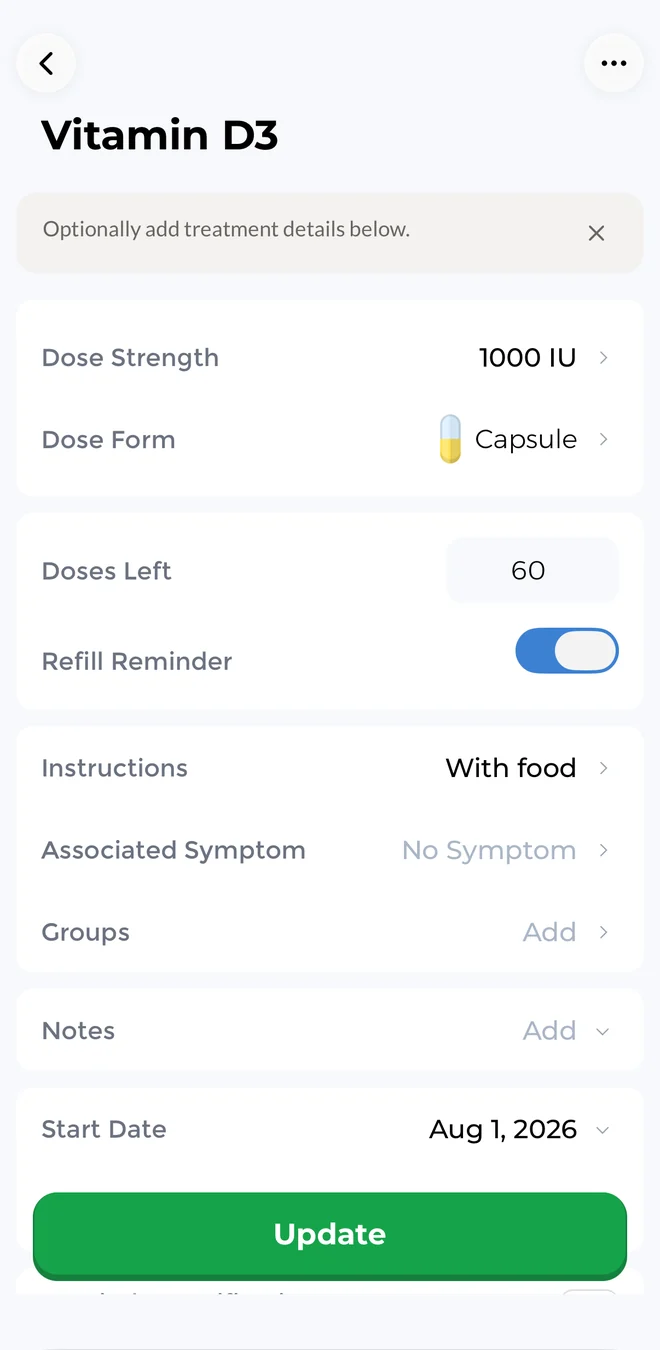
Type "metformin" or "lisinopril" and the app recognizes it. In CareClinic, the database includes prescription drugs and supplements. Then enter the dose, form and any instructions, such as taking it with food.
It also flags details that trip people up: levothyroxine works best on an empty stomach, 30 minutes before breakfast, and iron and calcium shouldn't be taken together.
- MetforminTablet
- LisinoprilTablet
- IronSupplement
Step 2: Build your schedule
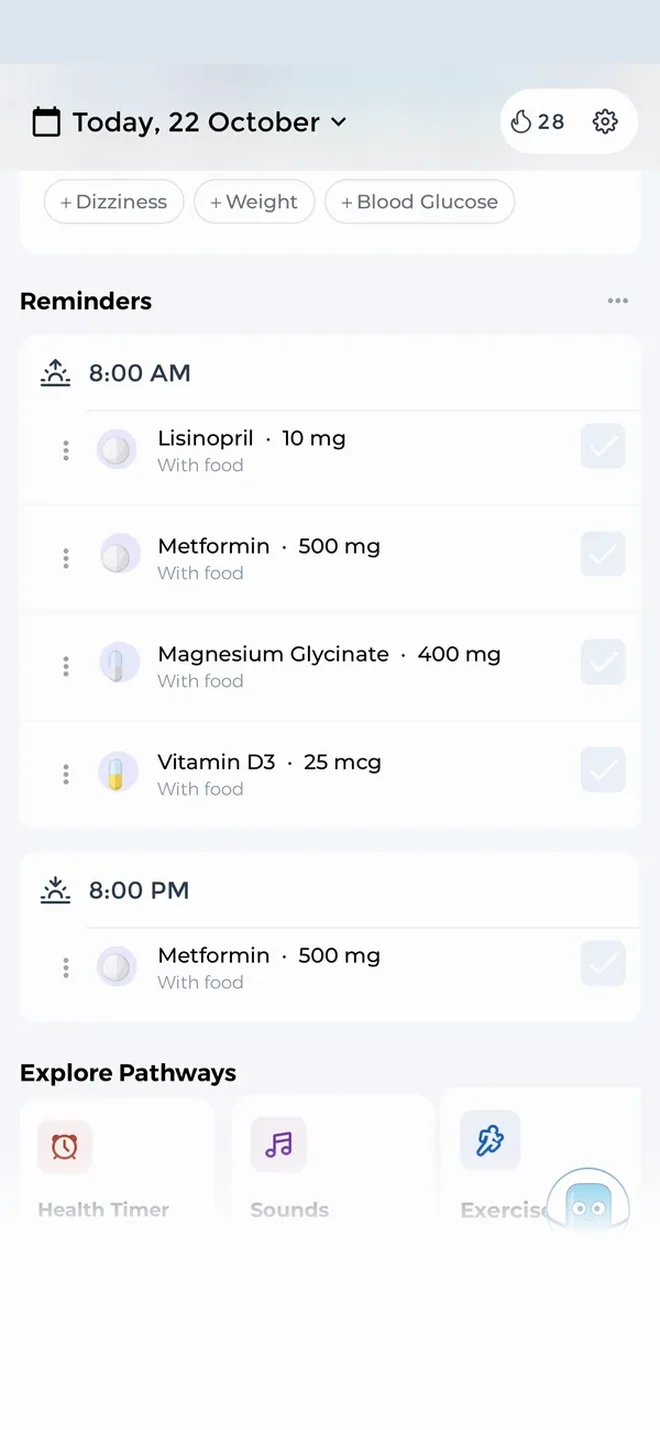
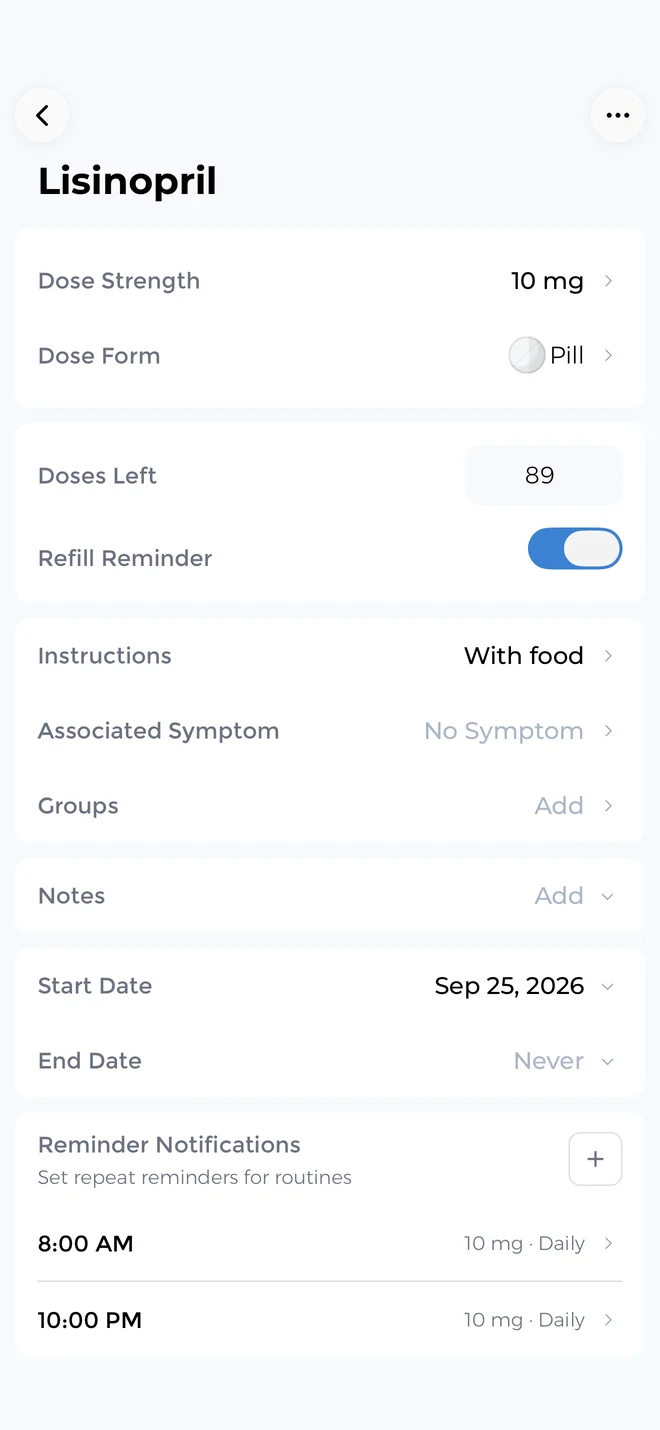
Set each dose for the time you actually take it. Thyroid medicine might be at 6 AM because you're up early with kids, while blood pressure tablets wait until 8 AM with breakfast.
Use a different schedule on weekends when your routine changes. A good medication reminder app understands that Tuesday morning looks different from Saturday morning.
Step 3: Turn on reminders
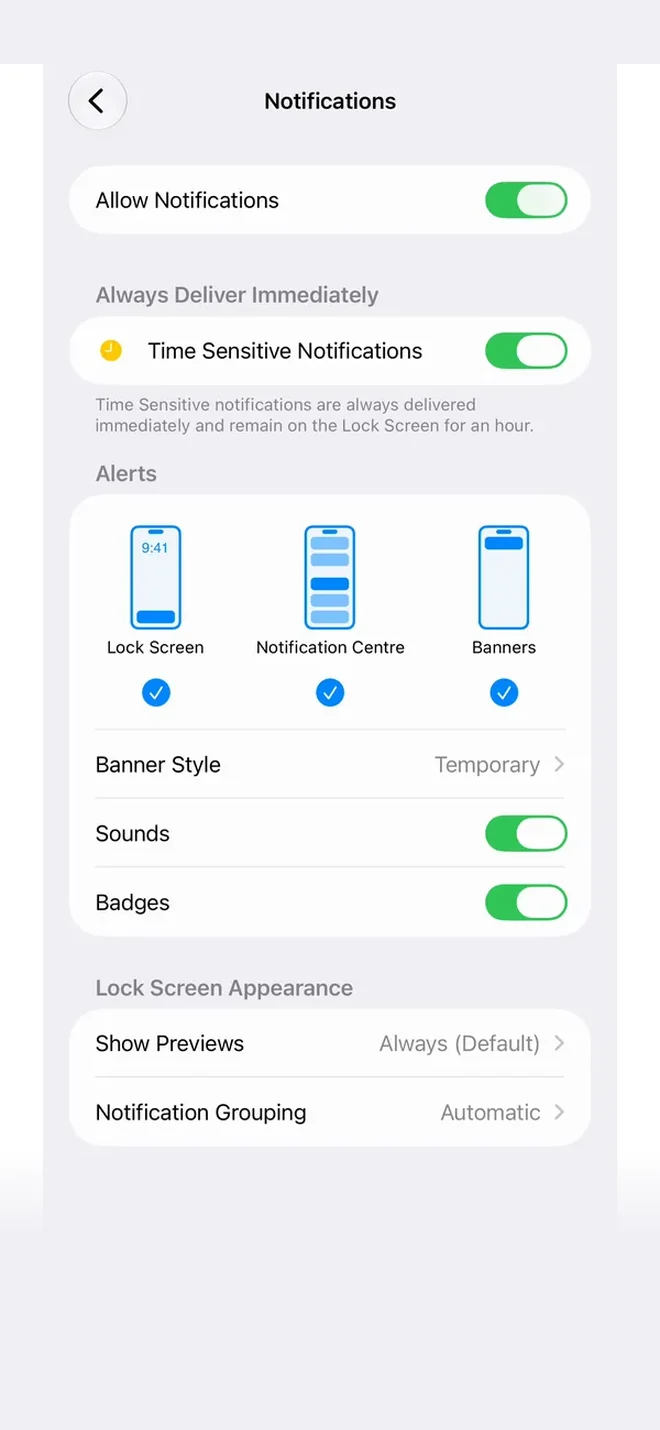
Allow notifications so reminders reach your lock screen. Choose daily, weekly or as-needed reminders, and add a refill alert so you never run out.
Medicine alerts need to do more than beep. Match each notification type to the medicine.
To see reminders, turn on notifications. On iPhone, open Settings, find CareClinic, tap Notifications and toggle them on. Android has a similar path in its settings.
- Settings
- CareClinic
- Notifications
- On
Daily notifications - Perfect for maintenance drugs like blood pressure or cholesterol tablets
Weekly alerts - Ideal for medicines like methotrexate or osteoporosis treatments
Monthly notifications - Great for injectable biologics or birth control
Tapering schedules - Automatically adjusts doses for drugs like prednisone
As-needed tracking - Logs PRN medicines without fixed schedules
Refill alerts - Prevents the panic of empty bottles
Step 4: Track supplements too
Yes, track them. St. John's Wort can make birth control ineffective, and calcium can block thyroid drug absorption. Tracking everything together reveals these hidden interactions.
Supplements are added the same way as prescriptions. You might learn that iron isn't working because you take it with morning coffee. In CareClinic, interaction checks run automatically and flag issues early.
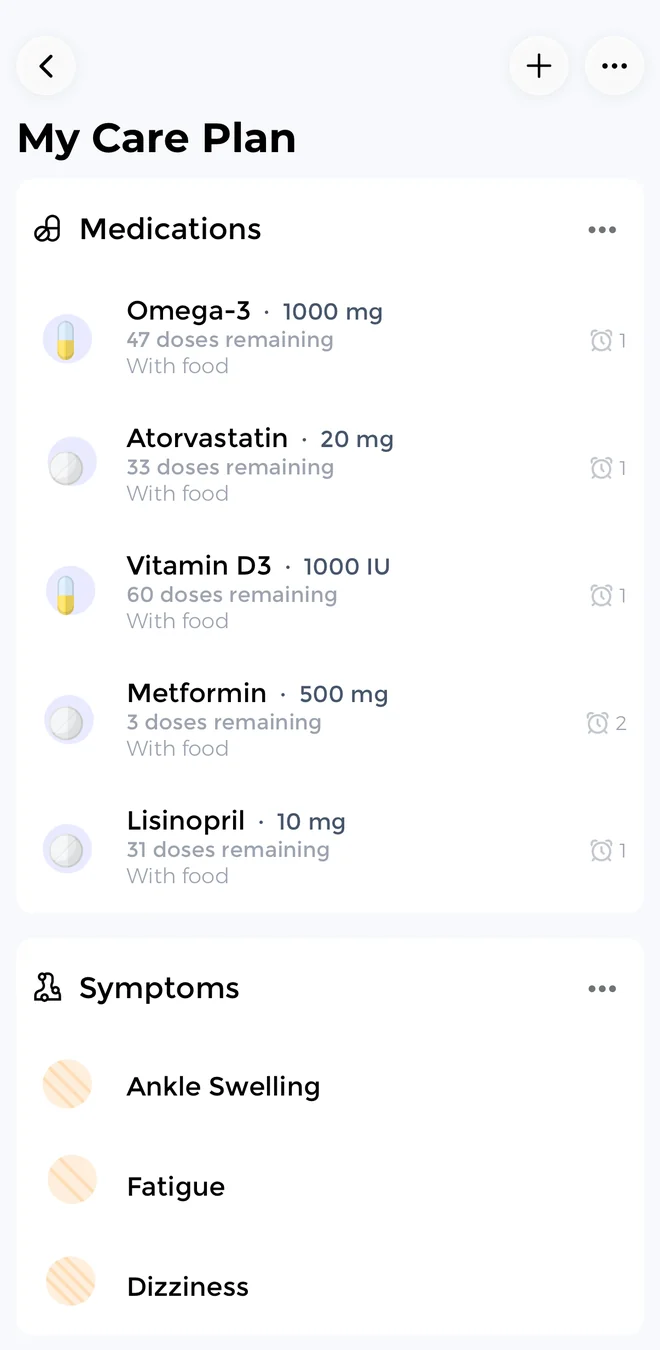
Step 5: Log each dose
Mark each dose as taken, or record the actual time if you log later. Doses left counts down with every entry, and your history shows missed doses before appointments.
Taking your tablets is only half the equation. Every logged dose contributes to a pattern that tells a story. Maybe you're incredibly consistent during the week but struggle on weekends when your routine changes.
These patterns matter because partial adherence often explains why treatments fail. Your doctor needs to know if a drug isn't working because it's ineffective or because you're only taking it 60% of the time. Learning how to use a medication tracker effectively means understanding these insights.
"Hey Siri, remind me to take my evening pills"
Voice assistants
Voice commands help when your hands are full, such as while cooking dinner. Hands-free reminders suit parents juggling children and professionals in back-to-back meetings.
Widgets and icon badges
A medicine widget next to your calendar shows what's due next, and an icon badge showing "3" might mean three tablets are due. Visual cues suit people who dismiss notifications too quickly.
Forgot if you took it?
This causes more anxiety than almost any other part of pill management. Log doses retroactively with the actual time you took the medicine, not the time you remembered.
Some apps offer "Mark as Already Taken" to stop further alerts for that dose. If you often forget, set two reminders: one to take the pill and another 30 minutes later to log it.
When doses vary
As-needed medicines
Pain relievers, rescue inhalers and anti-anxiety tablets are logged when you take them, with a note about why. Over time, notes like these reveal triggers and patterns.
Injection sites
For diabetes or biologics, rotating sites prevents lipodystrophy and keeps absorption consistent. Note reactions or pain at each site so you and your provider can see which sites work best.
Family members
Multiple profiles in one account keep each person's medicines separate. Notes like "Dad seemed confused after evening dose" help at appointments, and shared access keeps everyone informed.
Use your reports
Raw adherence percentages only scratch the surface of what your pill data reveals. A 75% adherence rate might sound decent until you realize all missed doses occur on weekends. These patterns point to fixable problems that improve your health outcomes when addressed.
Correlation between medicine adherence and symptom patterns often reveals surprising connections. Missing just one dose of your mood stabilizer might trigger anxiety two days later. When you can show your doctor that symptoms consistently worsen after missed doses, it validates the importance of adherence. Your medication tracker app becomes a powerful diagnostic tool.
Safety and refills
Interaction checks
Each new drug or supplement is checked for conflicts, such as a new antidepressant with your migraine medicine. You can then contact your doctor before problems arise.
Refill tracking
Refill timing follows your actual use, not calendar days, so you know when each prescription runs out. Set refill alerts to match your pharmacy. Logging works offline, and your data stays private.
Advanced features
Organizing pills by time periods dramatically simplifies complex regimens. Morning, afternoon, evening, and bedtime groupings create visual clarity. CareClinic's pill-shaped filter buttons let you focus on just the current time period.
Creating medicine groups for tablets taken together streamlines your routine significantly. Many people take several drugs simultaneously: a morning combination of blood pressure medicine, cholesterol pills, and daily vitamins. Grouping these together means one notification for the entire set.
Timing and peak effect
Knowing when a medicine peaks helps you plan. Schedule an important presentation for when your anxiety medicine works best, or physical activity during your pain pill's peak window.
CareClinic allows custom alerts like "Your arthritis medicine should be at full strength now."
Link it with other health data
Linking pill tracking with sleep, activity and symptom logs shows patterns, such as poor sleep after missed morning doses. That turns isolated data points into actionable health insight.
Make it a habit
Medication tracking doesn't require perfection. Start with your most important medicine, track it for one week, and add the rest once logging feels routine.
Before appointments, print or email your reports to your healthcare providers to make the most of a short visit. Your health data stays secure and private.
Learn more about our pill reminder app.
Practical medication tracking tips
- 01
Start small
Add one important medicine first, then the rest once the routine feels natural.
- 02
Follow the label
Match reminders to your prescription label and ask your pharmacist about timing with food or other medicines.
- 03
When unsure, check first
If you cannot remember taking a dose, check your record and follow your clinician’s instructions. Do not double up based on a reminder alone.
- 04
Keep profiles separate
Caring for a family member? Use separate profiles so each medicine list stays distinct.
Frequently asked questions
How long does it take to set up a medication tracker?
Most people add their medicines and reminders in about five minutes. Start with your most important medicine and add the rest over time.
What should I enter first?
Start with the medicine where a missed or double dose matters most, such as blood pressure or thyroid medicine, then add the rest.
Can I track vitamins and supplements too?
Yes. Adding supplements alongside prescriptions gives a complete picture and helps you spot interactions to discuss with your pharmacist.
How do I set different times on weekends?
Create separate reminder times for weekdays and weekends so the schedule follows your actual routine.
What if I forgot to log a dose?
Log it with the actual time you took it. If you are not sure whether you took it, check with your clinician before taking another dose.
Can I share adherence reports?
Yes. You can export a report of your doses and history and share it with your doctor or pharmacist.
Set up your tracker in minutes
Add your first medicine and reminder today.
Download for Free.